Templates and variables
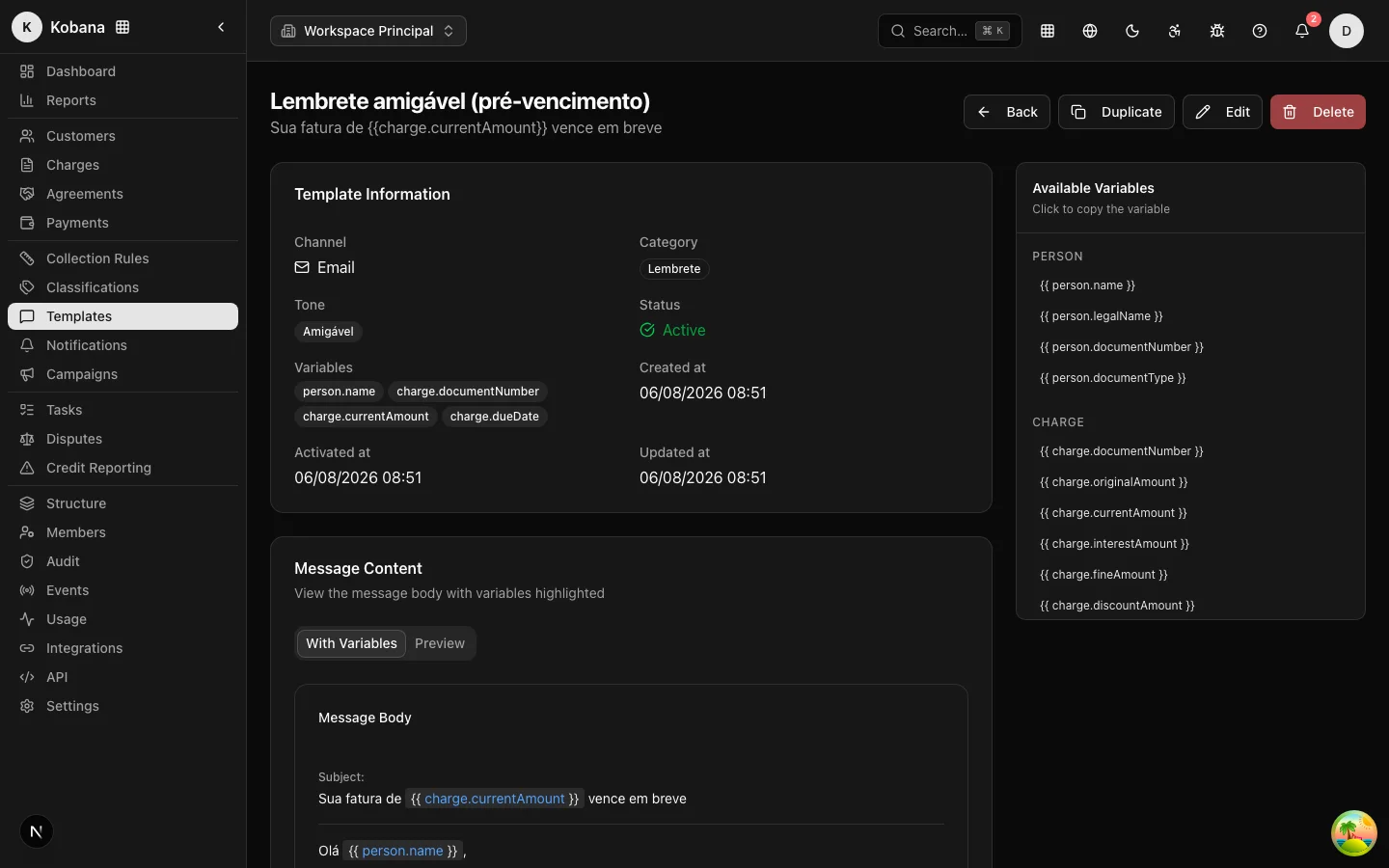
Templates are the messages that collection rule steps send. Each template belongs to a channel (email, SMS or WhatsApp), has a category, a tone and a body with variables that the engine replaces with the charge's real data at send time.
The editor: plain text and visual mode
The template body has two modes, and the difference is per channel:
- SMS and WhatsApp are always plain text — what you type is what goes out.
- Email gets a Text / Visual toggle: in visual mode, a rich-text editor formats the body with headings, bold/italic/underline, lists, quotes, links and alignment — without writing HTML. An older email written as text keeps opening as text; an HTML body opens straight in visual mode.
Two ways to insert variables without typos: the variable panel next to the form (click to insert at the cursor position) and, in visual mode, the Insert variable button in the editor's own toolbar. The Preview tab shows the message interpolated with sample data — including the email subject.
:::note Server-side sanitization
The email's HTML body is sanitized at save time, on the server: only the formatting tags and attributes the editor produces make it through (links with http/https/mailto/tel; text alignment). Scripts, iframes and the like are discarded — even if someone sends malicious HTML straight through the API. A plain-text template is saved byte for byte, with no transformation.
:::
Categories
| Category | Typical use |
|---|---|
Reminder (reminder) | Before the due date |
Overdue notice (overdue) | After the due date |
Negotiation (negotiation) | Agreement proposal |
Credit bureau warning (negativation_warning) | Prior notice required before registering with the credit bureau |
Protest warning (protest_warning) | Prior notice before protest |
Payment confirmation (payment_confirmation) | Post-payment |
Emails have a subject and a body; SMS/WhatsApp have only a body. Both subject and body accept variables.
Variable syntax
Write the variable between double curly braces; optionally, apply a formatter with |:
Olá {{ person.name }}, sua fatura {{ charge.documentNumber }} de
{{ charge.currentAmount | currency }} venceu em {{ charge.dueDate | date }}.
Pague pelo PIX: {{ charge.pixEmv }}
A variable with no value on file becomes empty text (the message does not break).
Available variables
Customer (person.)
| Variable | Content |
|---|---|
{{ person.name }} | Customer name |
{{ person.legalName }} | Legal name |
{{ person.documentNumber }} | CPF/CNPJ |
{{ person.documentType }} | Document type |
Charge (charge.)
| Variable | Content |
|---|---|
{{ charge.documentNumber }} | Document/invoice number |
{{ charge.originalAmount }} | Original amount |
{{ charge.currentAmount }} | Updated amount (with interest/fine/discount) |
{{ charge.interestAmount }} | Interest amount |
{{ charge.fineAmount }} | Fine amount |
{{ charge.discountAmount }} | Discount amount |
{{ charge.dueDate }} | Due date |
{{ charge.issueDate }} | Issue date |
{{ charge.daysOverdue }} | Days overdue |
{{ charge.status }} | Charge status |
{{ charge.barcode }} | Boleto barcode |
{{ charge.pixEmv }} | Pix copy-and-paste code |
{{ charge.paymentUrl }} | Payment link |
Your company (account.)
| Variable | Content |
|---|---|
{{ account.name }} | Company name |
{{ account.tradeName }} | Trade name |
{{ account.documentNumber }} | Company CNPJ |
{{ account.phone }} | Contact phone |
{{ account.email }} | Contact email |
{{ account.website }} | Company website |
Classification (classification.)
| Variable | Content |
|---|---|
{{ classification.name }} | Name of the customer's classification |
The collectionRule. and collectionRuleStep. prefixes (data about the rule and the step that originated the send) are also available for advanced cases.
Formatters
| Formatter | Result |
|---|---|
currency | R$ 1.234,56 |
date | 25/12/2025 |
dateTime | 25/12/2025 14:30 |
document | 123.456.789-00 |
phone | (11) 99999-9999 |
Example: {{ charge.currentAmount | currency }}, {{ person.documentNumber | document }}.
Validation
When saving, the system validates the template: unknown prefixes, nonexistent formatters and unbalanced braces ({{ without }}) are flagged as errors before the template goes live. The variable panel lists everything available for the chosen category — click to insert without typos.
Best practices
- Have one template per step and match the tone to how overdue the debt is: friendly before the due date, firm after 15 days.
- Always include a payment path (
charge.pixEmv,charge.paymentUrlorcharge.barcode) — a collection message with no way to pay generates calls to your support team. - For credit bureau and protest warnings, use the correct category: they document the prior notice in the audit trail.