Self-service
The debtor portal is where customers resolve their own pending debts: view what they owe, pay by boleto or Pix, simulate an installment plan and close an agreement — without talking to anyone on your team, at any hour.
The portal has two ways to sign in. This page describes the quick token link: a one-off, individual access with no sign-up or password. There is also a persistent account (email and password), for debtors who want to come back and track their situation over time.
Generating the link
On the customer's record (Customers → detail), generate the portal link: a unique URL in the format /portal/<token>, valid for 30 days. Send it by email, SMS or WhatsApp — including through the collection rule templates themselves. Generating a new link requires nothing from the debtor; old links can be revoked or rotated (see Security).
Before any amount: identity verification
Whoever opens the link sees the bare minimum: the customer's first name, your organization's name (and logo) and a request to confirm the last 4 digits of the CPF/CNPJ. Only after confirmation does the portal show amounts and details. A link in the wrong hands exposes nobody's debt.
What the debtor finds
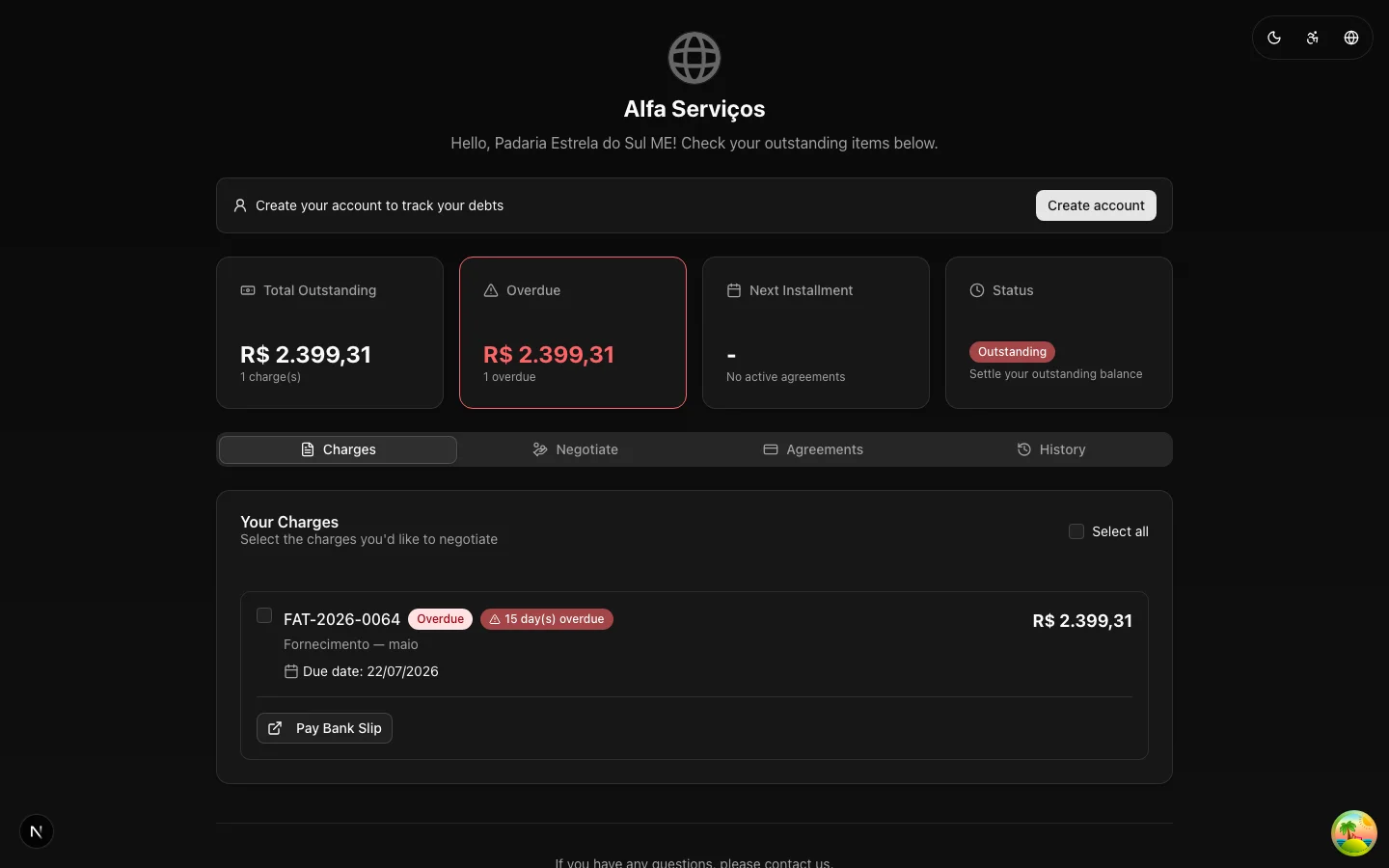
Once verified, the portal presents a summary — total outstanding, overdue charges, next installment of an agreement and overall status — and four tabs:
- Charges — each debt with due date, days overdue and updated amount. Pay boleto and copy Pix code buttons right in the list.
- Negotiate — the debtor selects one or more charges and simulates the installment plan (up to the active offer's ceiling). The discount appears automatically based on the negotiation campaigns valid for their overdue range; among several, the highest discount wins.
- Agreements — active agreements with a progress bar ("3 of 12 installments"), amounts and due dates.
- History — the record of interactions.
Accepting an agreement
Once the simulation looks good, the debtor accepts the terms and the agreement is created already accepted, with installments generated (first due in 10 days) and the IP and terms recorded as evidence. The server revalidates the proposal against the active offer — a discount or installment plan outside what was authorized is rejected, even if someone manipulates the page (details). The charge exits the collection rule and your team sees the agreement right away, with a webhook to integrate with finance.
"Not me"
Reaching the wrong recipient happens — recycled phone number, similar email, namesake. For that, the identity verification screen itself carries the way out: below the confirm button, the question "Not you?" with the link "I'm not [name]". Whoever clicks it sees a confirmation dialog that explains exactly what will happen — the organization will be told the contact belongs to someone else, the sends stop and the link stops working — and can leave an optional comment. Upon confirming, the system immediately:
- Marks the contact as a third party (a
third_partysuppression on all channels, with no expiration); - Suppresses every pending notification for that person;
- Revokes all of their portal links.
Nobody dunns that contact by mistake again — and the record goes into the audit trail. This flow does not require identity verification (a third party has no way to confirm the debtor's document — and should not), and it deliberately sits before the verification: it is the only action possible for someone who cannot get past it.
:::caution A flag with no reversal from the interface The "not me" is final: there is no button to undo it, and the system starts refusing to generate new portal links or create an account for that person. If the record was correct and the click was a mistake, treat it as a data-correction case with support — the design starts from the principle that it is worth more to stop dunning a third party than to risk contacting them again. :::
With your brand
The portal displays your organization's logo and name — the debtor negotiates with your brand, not with an unknown system. See White-label.