Tasks and team
The Tasks screen is the operators' work queue: everything the collection rule cannot resolve on its own (or that you chose to handle manually) becomes a task with a type, priority and due date.
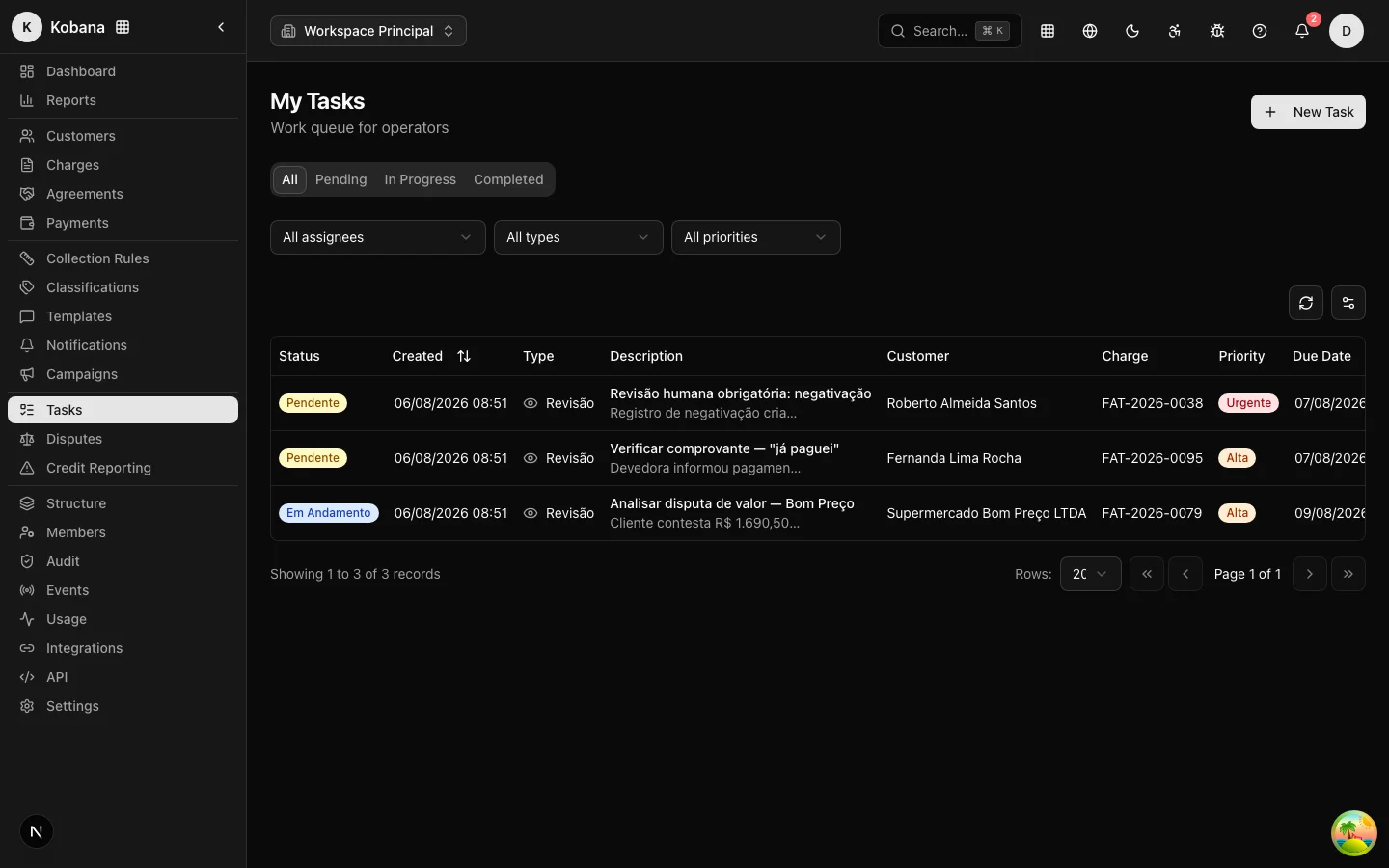
Anatomy of a task
Each task has:
- Title and description — what needs to be done.
- Type: Call (
call), Email (email), Visit (visit), Review (review) or Follow-up (follow_up). - Priority: low, medium, high or urgent.
- Status: pending, in progress, completed or cancelled.
- Due date (
dueAt) and assignee (assigned member). - Links to the customer and the charge, when they exist — the task shows up in the right context.
- Tags and custom data for your internal organization.
The list has tabs by status (All, Pending, In Progress, Completed) and can be sorted by due date or creation. On each row you can open the detail or complete it directly.
Who creates tasks
- You, via the New Task button (or the API).
- The collection rule, automatically:
- A credit bureau registration or protest step creates a Review task with urgent priority — nothing goes to the bureau or notary office without human approval (see Credit Bureau & Protest).
- A manual task step creates a high-priority follow-up due in 24 hours.
- A legal escalation step creates an urgent Review task.
- An old step with the voice channel (legacy) creates a high-priority Call task ("Call [customer]"), with the template text as the script — voice does not dial on its own (Steps and channels).
- A debtor who replies "I already paid" pauses the rule and generates a proof-of-payment verification task.
The human review queue
Pending Review tasks form the human review queue, highlighted on the dashboard. It is where the decisions the system refuses to make on its own live: approving credit bureau registration/protest, validating proof of payment, escalating to legal.
Complete, edit, delete
On the task detail: Complete (available while it is neither completed nor cancelled), Edit and Delete (with confirmation). Completing records the moment (completedAt) and fires the task.completed webhook for whoever subscribes to the event.
Operator notifications (the bell)
The bell at the top of the screen tells you what needs you, without anyone having to keep reloading lists:
- Mandatory review of a credit bureau registration or protest (urgent, takes you straight to the task queue).
- Debtor reported a payment ("I already paid"): time to verify the proof.
- Agreement broken — an installment went past the grace period and the agreement broke; the charges have returned to the collection rule (Installments and default).
- Payment promise broken — the promised deadline (plus the grace period) passed without payment and the rule was resumed (Payment promise).
- Import finished (with created, updated and errors) and export ready.
- API key expiring (urgent when 2 days or less remain).
The counter shows unread items; clicking a notice marks it as read and navigates to the action's screen. There is also a Mark all button. Notices without a specific recipient apply to the whole organization, and the same fact never generates two alerts (emission is idempotent per event).
These notifications are for the operator — do not confuse them with the collection notifications sent to the debtor, which live on the Notifications screen.
Permissions and audit
What each member can do with tasks follows the permission catalog (tasks.list, tasks.create, tasks.complete...) described in Members and permissions. Every relevant action goes into the append-only audit trail.