Rollout: rule and channels
Second half of the rollout: design the rule, publish it, and turn on the sending channels. This is where the account stops being a database and becomes a collection operation.
1. Design the rule
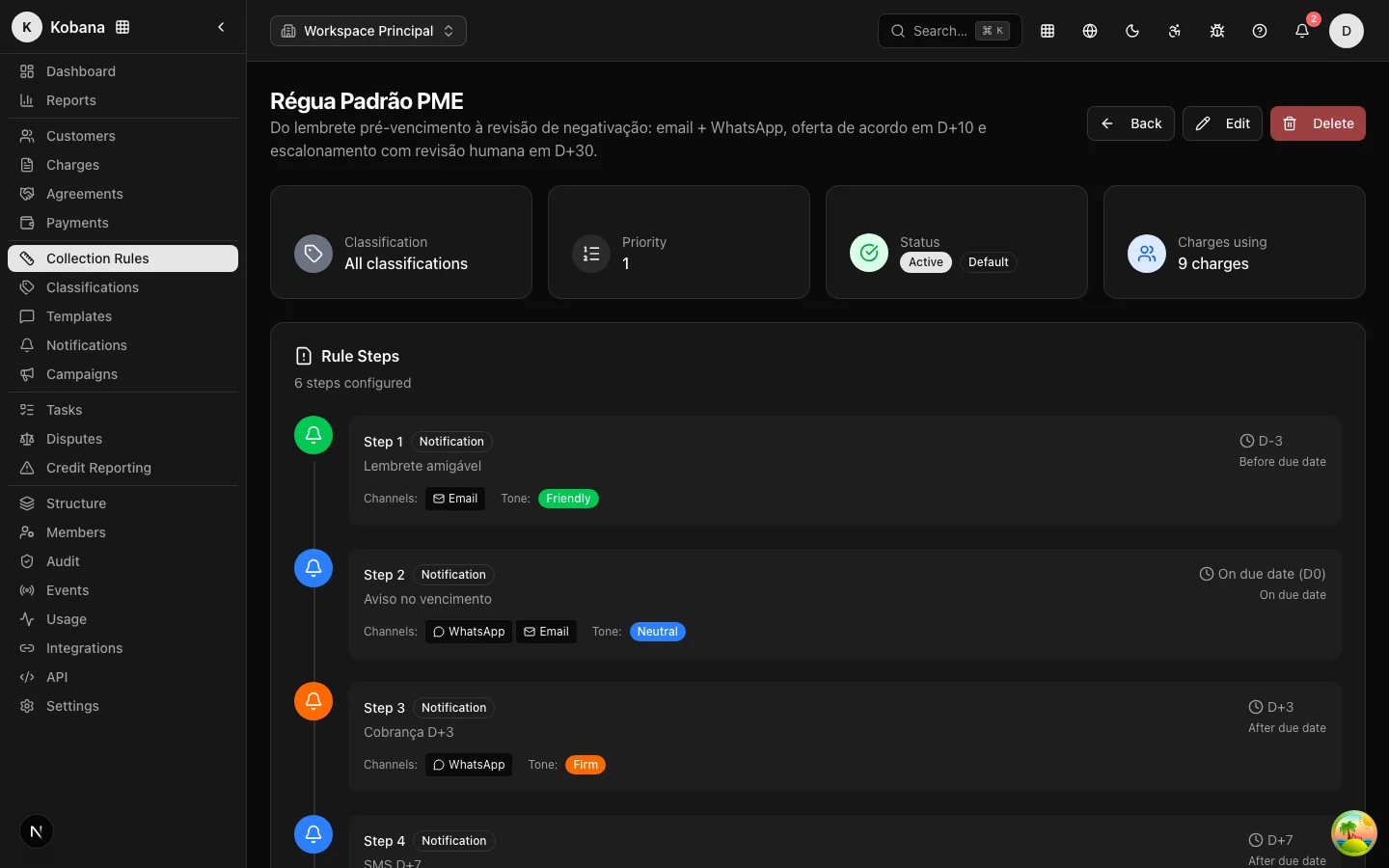
A collection rule is a sequence of steps anchored to the due date. Each step answers three questions (details):
- When — trigger + offset: before the due date (
before_due), on the day (on_due), after the due date (after_due), after issuance, or after payment. - What — notification, negotiation offer, manual task for the team, credit bureau registration/protest (always with human review), or legal escalation.
- Where — email, SMS, WhatsApp, or manual (voice is not configurable — there is no telephony provider; for phone calls, use the manual task). If there is no contact for a channel, that channel is skipped; the others proceed.
A starting design that works well:
| Moment | Step | Tone |
|---|---|---|
| −3 days | Email reminder | Friendly |
| Due date | "Due today" by email + WhatsApp | Neutral |
| +5 days | Collection message by email + SMS | Firm |
| +15 days | Negotiation offer (portal) | Neutral |
| +30 days | Manual call task for the team | — |
Each step executes at most once per charge, and the per-person contact limits (default: 2/day, 6/week, 4-hour gap) prevent bombardment even when several steps become eligible at once.
2. Write one template per step
Without a template, the system sends a generic reminder; in practice you will always want one template per step, with the right tone for the age of the debt and interpolated variables ({{ person.name }}, {{ charge.currentAmount | currency }}, {{ charge.dueDate | date }}). Two golden rules:
- Always include a way to pay —
{{ charge.pixEmv }},{{ charge.paymentUrl }}, or{{ charge.barcode }}. A collection message without "how to pay" becomes a call to your support line. - Use the correct category for credit bureau and protest warnings: they document the required prior notice in the audit trail.
The editor validates variables and formatters on save — typos never go live.
3. Publish and mark as default
When the rule is used for the first time, version 1 is published automatically — an immutable snapshot of the active steps. Charges enroll into the current version and stay pinned to it; edits only apply to future enrollments (Versions and publication).
Mark one rule as the organization's Default. It is the one the daily check assigns to every open charge without a rule — the "uploaded a spreadsheet with 5,000 receivables, tomorrow they are all enrolled" guarantee. If you use classifications, tie specific rules to payer profiles; priority decides in case of overlap.
4. Configure the sending channels
Settings → Notifications holds the account's email, SMS, and WhatsApp providers. This step has a behavior that works in your favor during rollout:
:::info Without a configured channel, everything is simulated As long as no sending channel is configured, the rule runs end to end without sending any real message: steps show up in the history as simulated. Use this deliberately — validate the rule design against the real portfolio before turning any channel on. :::
5. Check compliance
The compliance engine comes armed: legal windows per state (including national holidays), per-person limits, and suppressions. What depends on you:
- State (UF) on addresses — without it, the conservative national window applies (it works, but may reschedule more than necessary).
- Known suppressions — if you are migrating from another operation, record opt-outs and sensitive cases before the first send.
- Custom limits — the defaults are conservative; adjust the organization's contact policy only if you know what you are doing.
6. (Optional) Negotiation campaigns
Campaigns offer automatic discounts on the portal by overdue range (e.g., 5% up to 15 days, 15% from 16 to 60, 30% beyond). Acceptance is validated server-side: a proposal tampered with in the browser is rejected and logged.
How to know this stage is done
- Rule active, published, and marked as Default; steps with their own template and tone.
- Simulated executions checked in the detail of a few real charges (the rule enrolled, scheduled, and respected the windows).
- Channels configured — or deliberately off until go-live.