Resolution
Resolving a dispute means answering two questions: is the debtor right? (decision) and what to do with the charge? (effect). The dispute screen asks for both, plus a written, reasoned decision — mandatory, because it goes into the audit trail.
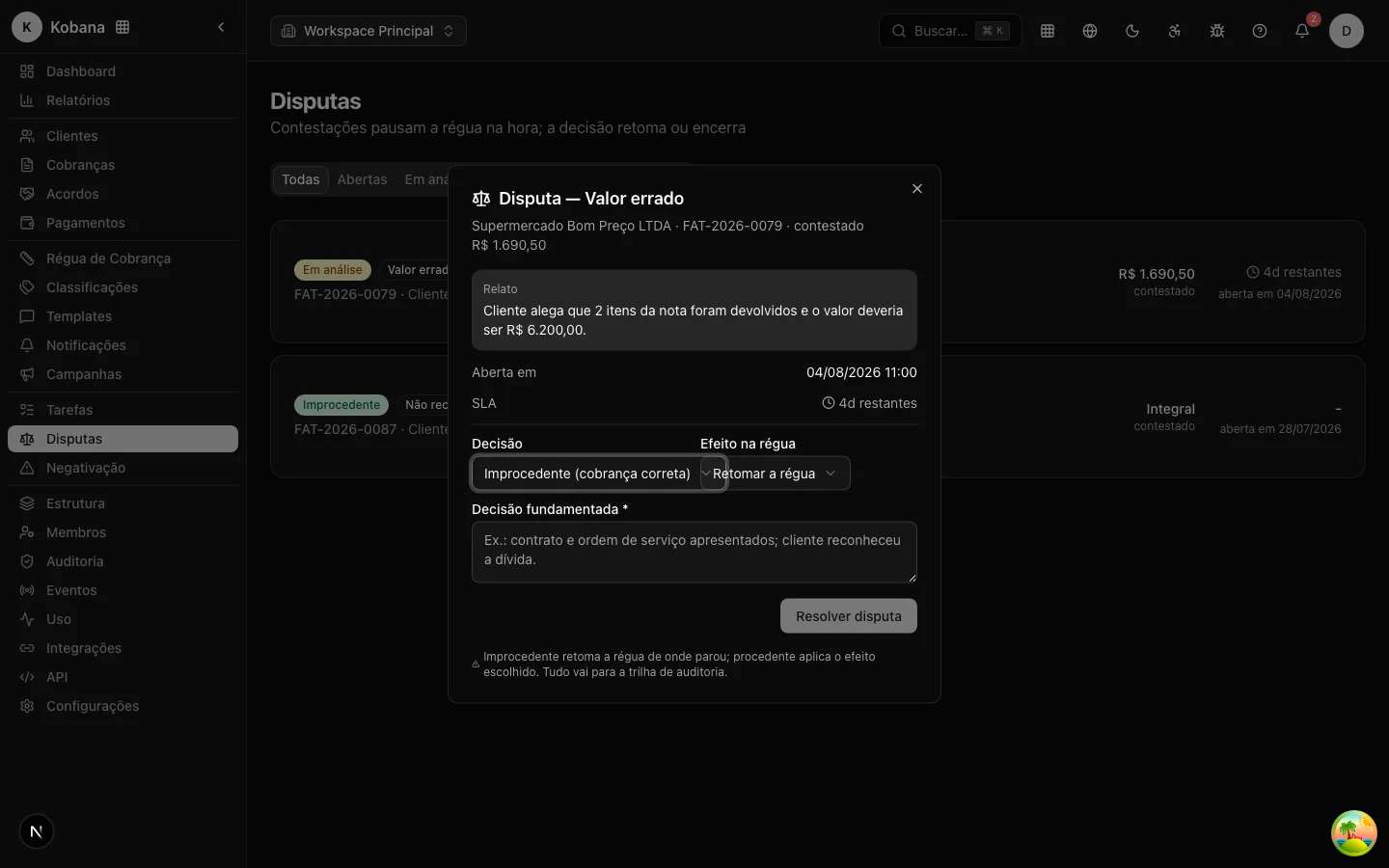
Decision
- Rejected (
resolved_invalid) — the charge is correct; the debtor is not right. - Upheld (
resolved_valid) — the debtor is right, in full or in part.
Available effects
| Effect | What the system does | Typical use |
|---|---|---|
Resume the rule (resume_rule) | Reactivates the enrollment paused by the dispute — the rule continues exactly from where it stopped, without repeating steps | Rejected (default) |
Adjust the amount and resume (adjust_amount) | Updates the charge's current amount to the decided value and resumes the rule | Partially upheld: the amount was wrong, but the debt exists |
Cancel the charge (cancel_charge) | The charge becomes cancelled, exits the rule permanently, pending sends cancelled | Upheld: the debt is not collectible |
Write off the debt (write_off) | The charge becomes written_off, enrollments closed | Upheld: business decision not to collect |
Without an explicit effect, the system applies the default consistent with the decision: rejected → resume the rule; upheld → cancel the charge.
What happens in every resolution
Regardless of the decision:
- The suppression created by the dispute is revoked — the debt is no longer blocked for that reason (the person's other suppressions, if any, remain in force).
- The effect is applied to the charge and the rule, per the table above.
- The resolution enters the customer's timeline and the audit trail, with decision, effect, adjusted amount (if any) and the reasoning text.
- The
dispute.resolvedwebhook is emitted.
Resuming "from where it stopped"
The resume behavior is worth highlighting: the rule does not restart and does not repeat what was already sent. The paused enrollment returns to active and the daily check keeps evaluating the next steps by the age of the debt. If a step "passed its point" during the dispute (e.g. the +10-days step, and the debt is now at 18), it fires next, respecting the contact limits.
Cancelling a dispute
A dispute opened by mistake can be cancelled (with no decision on the merits): the suppression is revoked and the rule resumes from where it stopped, with the cancellation audited and the dispute.cancelled webhook emitted.
Best practices
- Always state your reasoning — "contract and service order presented; customer acknowledged the debt" is worth more in a hearing than any screenshot.
- For an "already paid" claim with valid proof, the natural path is not a rejected dispute: record the payment (the charge exits the rule as paid and enters the recovery report).
- Resolve within the SLA: every day a dispute stays open is a day without collecting that debt.