Payment and settlement
Dunning's golden rule is simple: no messages after payment. This page explains how a payment enters the system, what happens at settlement, and how the "I already paid" verification and the legal hold work.
How payment arrives
Every payment enters as a payment event, with its origin and evidence recorded:
- Gateway webhook (Kobana) — in integrated mode, confirmation arrives in real time and settlement is automatic. Webhook deliveries are deduplicated: provider redeliveries have no double effect.
- Integration (PSP/CNAB) — signals from other payment providers or from bank return files.
- Manual — the operator records the payment on the charge (for example, a transfer received externally), entering amount and date.
Each event carries a confidence level based on its origin — a gateway confirmation counts for more than an unsupported claim — and that is what separates immediate settlement from human verification.
What happens at settlement
When a payment is confirmed:
- The charge becomes Paid, with Payment Date and Paid Amount recorded.
- The rule is completed and every send not yet fired is suppressed on the spot — including messages already queued. As a final safeguard, the system rechecks the charge's state milliseconds before each send; if payment arrived in the meantime, the message is suppressed with the reason recorded.
- If the charge was overdue, enrolled in a rule, or negotiated, the recovery is recorded in the recovery metrics.
- The customer is automatically reclassified (the payment changes their history).
Derived cases:
- Partial payment — the original charge is settled for the amount paid (partial settlement: it becomes Paid, ends the rule for that charge, and records the recovery of the amount received) and the system creates a child charge for the remaining balance. That child charge is due on the payment date, re-enters the rule from the start, and interest now accrues on the balance (no longer on the full amount). The child charge points back to its source charge in
metadata.partialPaymentParentChargeId. - Reversal — the charge reopens (returns to Overdue) and restarts the rule from the beginning (a new collection cycle), resending the notices. Credit bureau registration/protest actions still active are not duplicated.
"I already paid": verify before insisting
When the debtor claims they have already paid (through the portal or recorded by the operator), the system never pushes back with stale data. The flow:
- The rule pauses immediately and pending sends are cancelled.
- A low-confidence "claimed" payment event is recorded with whatever evidence exists.
- A verification task enters the operator's queue, and an alert appears in the bell.
- The operator checks the proof and resolves it: confirmed — the charge is paid and closed; not confirmed — the rule resumes exactly where it left off.
The paymentClaimed field flags the charge during verification, and the status card on the detail view shows the pause with its reason.
Legal hold
The legal hold (legalHold, with the reason in legalHoldReason) blocks the charge for legal reasons — debt under litigation, statute of limitations. With the hold active:
- No rule message goes out: the pre-send check suppresses any step, with the reason recorded.
- Credit bureau registration and protest actions are blocked.
The hold does not cancel the debt; it freezes activity until the legal situation is resolved.
The actions on the charge screen
The charge detail carries the settlement actions the operator runs by hand, plus a section that lists what has already come in.
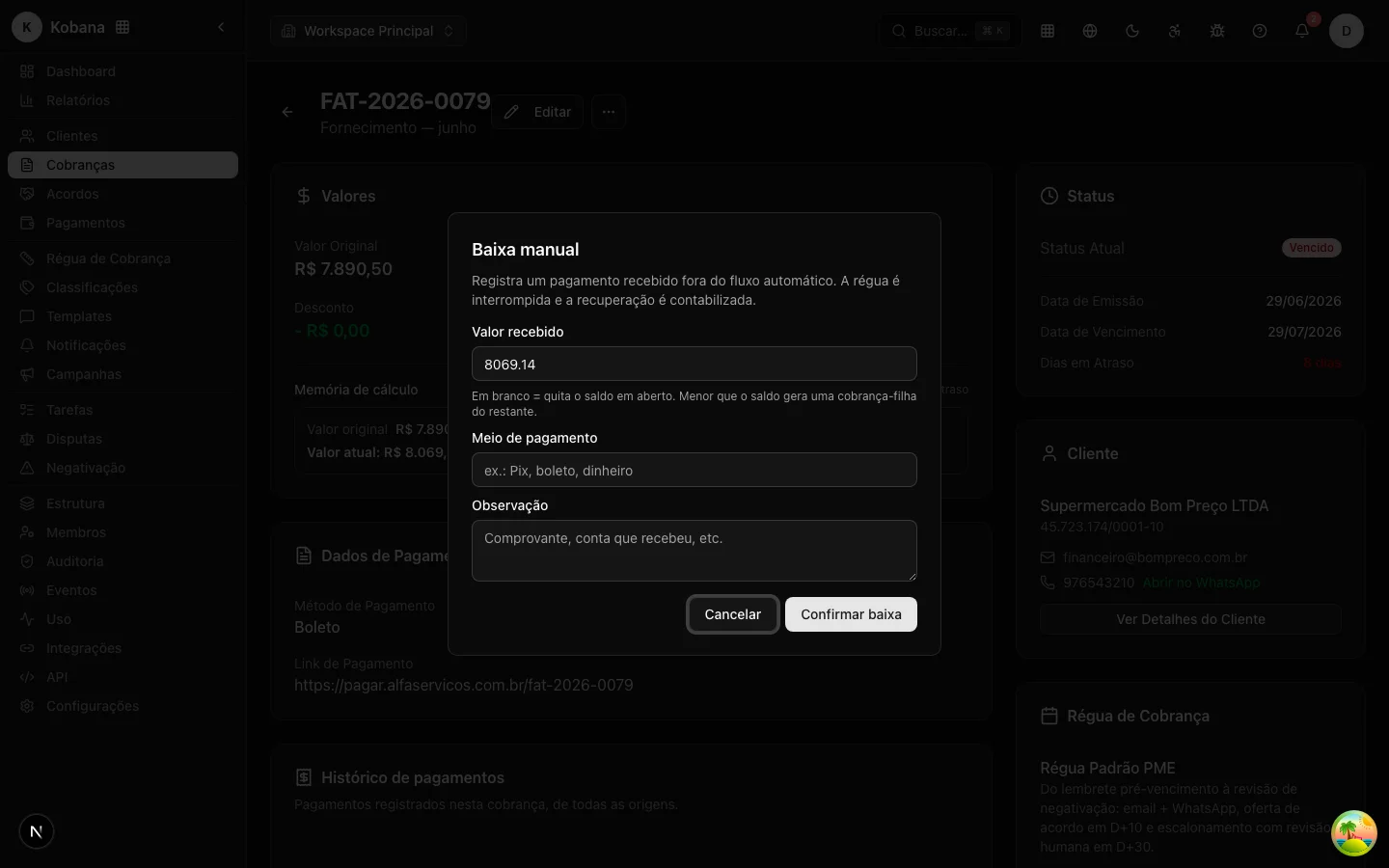
Mark as paid
The Mark as paid action performs the manual settlement: it records a payment event of manual origin on the charge. The dialog comes pre-filled with the remaining amount, and you can adjust the amount, enter the payment method, and add a note. The effect depends on the amount:
- Full amount: the charge is paid off and becomes Paid.
- Partial amount: the charge is settled for the amount paid and the system generates the child charge for the balance, which re-enters the rule from the start (the same mechanics described above under Partial payment).
The action is available while the charge is not yet paid, cancelled, or written off.
Undo settlement
For a paid charge, the Undo settlement action records a reversal: the charge reopens (returns to Overdue) and the rule restarts from the beginning, resending the notices. The dialog accepts an optional note. It is the path to correct a settlement made by mistake or a payment that did not hold up.
Payment history
On the detail, the Payment history section lists, on a timeline, every payment event of that charge: amount, type (confirmed, partial, reversed, claimed), origin (Kobana, PSP, CNAB, manual), payment method, and date. It is the per-charge slice of the global Payments list.
Email preview
When you send a manual notification from the charge, the system first opens a preview: the channel, the recipient, the subject, and the body already interpolated with the real data of the charge and the customer. Nothing is sent until you confirm, and the send button stays disabled if there is no valid recipient. It serves to check exactly what the debtor will receive, with no surprise from an unfilled variable.
Audit
Every payment event, settlement, suppression, and verification lives in the audit trail, which is immutable (records cannot be altered or deleted). If anyone asks "why did you stop collecting?" or "why did you collect after payment?", the answer is on record — and the second question should never have a reason to exist.