Fees and adjustments
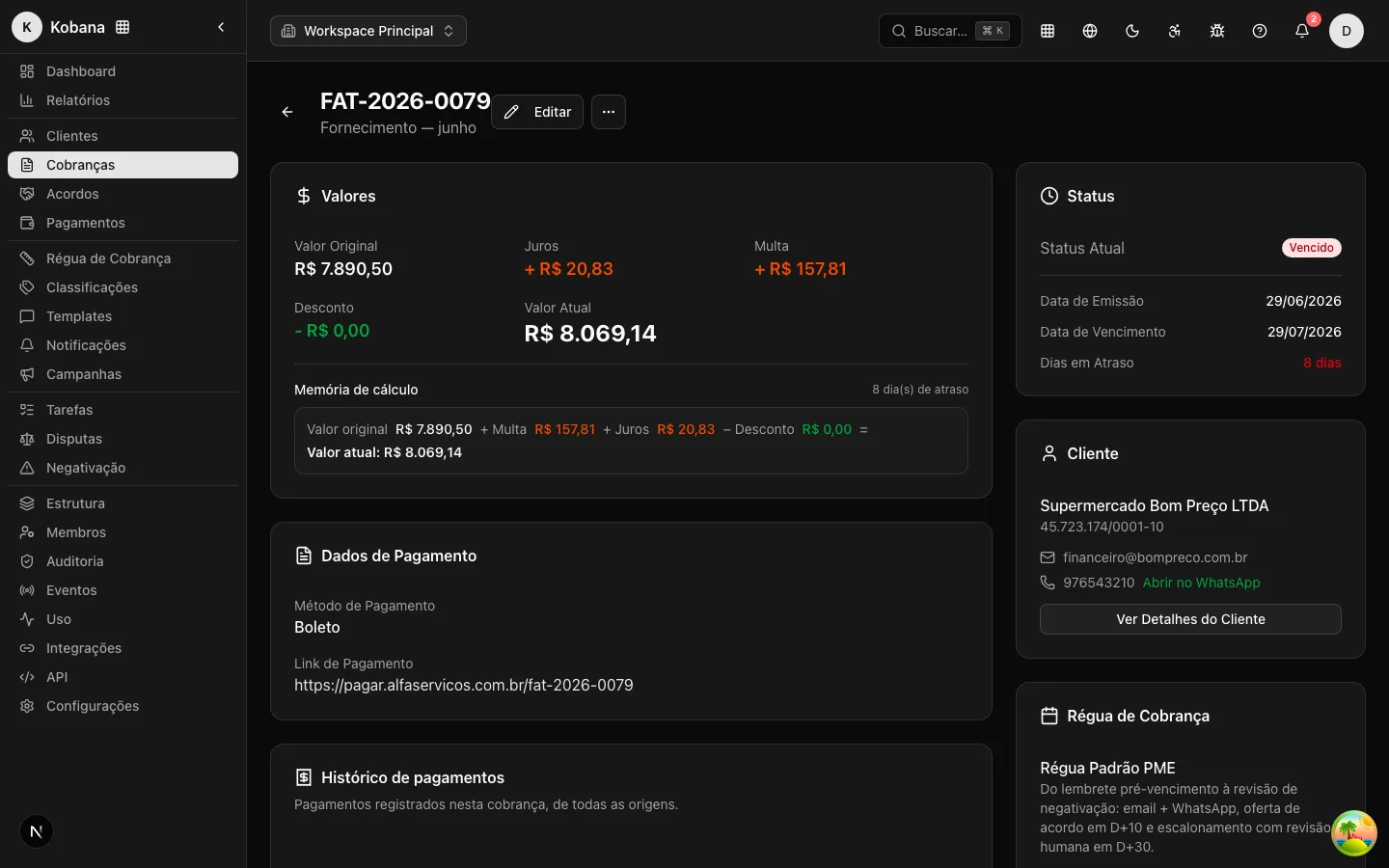
When a receivable falls due without payment, the amount owed grows because of fees: a fine, late interest, and, optionally, monetary correction. In the other direction, the creditor may offer a discount for punctual or early payment. This set is what turns the Original Amount into the Current Amount the debtor sees in rule messages and in the portal.
The fees engine was designed to handle money charged to the debtor with no room for error: the calculation is idempotent (recomputing from scratch never corrupts or duplicates amounts), done in whole cents with half-up rounding, and always evaluated in the organization's timezone.
The four fees
- Fine (
fineAmount) — the penalty for not paying on time. It applies once after the due date. It can be a percentage of the original amount (percent) or a fixed value (fixed). - Late interest (
interestAmount) — the charge for the time overdue. It accrues pro rata die: each overdue day adds a fraction. Configurable per month (percent_month), per day (percent_day), or as a fixed value per day (fixed_day). - Discount (
discountAmount) — a reduction granted for early or punctual payment. Defined in bands by cutoff date (the earlier the payment, the larger the discount). - Monetary correction (
correctionAmount) — an index-based update (IPCA or IGP-M). The field and its configuration already exist, defaulting to no correction (none); index-based application is reserved for a later phase and does not yet enter the current amount.
Fine, interest, and discount can each be turned off individually (disabled).
Three-level configuration
The fees policy can be set in three places, from the most general to the most specific:
- Account (
Organization) — the organization's default, applied to anything that does not override it. - Collection rule / campaign (
CollectionRule) — overrides the account default for that rule's receivables. - Charge (
Charge) — overrides everything, for a specific receivable.
Precedence: the most specific wins, with field-by-field inheritance
The resolver starts from the system's legal defaults and applies the layers in order (account, then rule, then charge). The most specific layer wins, but the merge is field by field: one level may set only the fine and inherit the interest from the level above. So configuring a discount on the rule does not wipe out the fine inherited from the account.
Above all layers sits one exception: when the receivable has a registered boleto carrying fees, that boleto is the source of truth and the engine mirrors the values instead of recomputing them (see Mirroring the boleto).
Legal defaults and ceiling warnings
When no layer defines a fee, the system's legal defaults apply:
| Fee | Default | Basis |
|---|---|---|
| Fine | 2% (percentage of the original) | CDC ceiling for consumer relations |
| Late interest | 1% per month (≈ 0.033% per day) | Market practice |
| Discount | Disabled | — |
| Correction | No correction (none) | — |
The configuration accepts values above these thresholds, but shows warnings when you exceed the reference limits: a fine above 2% signals it is over the CDC consumer ceiling (Brazilian Consumer Protection Code, art. 52, §1º), and interest above 1% per month signals risk against usual practice and the legal cap on interest (Law 14.905/2024, which amended art. 406 of the Civil Code). The warnings do not block saving: they only flag the legal risk so you decide knowingly.
How the current amount is calculated
On top of the immutable base (originalAmount + dueDate), the engine derives the fees and reaches the current amount:
Current Amount = Original Amount + Fine + Interest + Correction − Discount
Calculation rules:
- Days overdue are counted as calendar days between the due date and today, in the organization's timezone. A receivable that is current has zero days overdue.
- Fine: applied once, from the first day after the due date (honoring an optional grace period in days,
graceDays). A percentage applies to the original amount. - Late interest: accrues per day from the due date (also with an optional grace period). A monthly rate is converted to daily by dividing by 30, and the total is
daily rate × chargeable days × original amount. - Discount: applies only while the receivable is not yet overdue. Among the bands whose cutoff date has not passed, the one with the nearest deadline wins (the best early-payment discount).
- Rounding: all the math is done in whole cents with half-up rounding, to avoid accumulating floating-point error. The current amount never goes negative.
- After a partial payment: the remaining balance becomes a child charge with a new immutable base (the balance itself) and a due date on the payment date. From then on, late interest accrues on the remaining balance — not on the full principal — and without reapplying the fees already embedded in it. See Payment and settlement.
Each calculation stores an auditable memory: the source (computed or mirrored from the boleto), the days overdue, and the formula for each component (for example, "1%/month × 12 day(s) on R$ 500.00"). This makes it possible to reconstruct and explain exactly how the current amount was formed, both on the charge detail view and in the debtor portal.
Mirroring the boleto
A boleto registered at the bank (via CNAB/CIP) already carries a fine, interest per day, and a discount with its dates, and it is the bank that settles the receivable with those fees. When the charge has a registered boleto with fees, the engine enters mirror mode: instead of recomputing, it copies the values from the registration (encargoSource = 'boleto') so the platform shows exactly what will be charged at clearing. In this mode, the account/rule/charge fees policy is not applied.
Fees in the API
The charges resource (/api/v1/charges) exposes the fee breakdown: originalAmount, fineAmount, interestAmount, correctionAmount, discountAmount, and currentAmount, plus daysOverdue. Your integration can display or verify the composition of the amount owed without reimplementing the calculation. See the reference at /api/v1/charges.
:::tip Editing amounts case by case For a manual adjustment on a single receivable (reflecting a negotiation made outside the system, for example), the charge edit form lets you change interest, fine, and discount directly. For a recurring policy, configure the fees on the account or the rule. And if the one contesting the amount is the debtor, the path is to record a dispute, not to edit the receivable. :::