Customers
Customers are the people (individuals or companies) in your portfolio — in the interface, the Customers page in the sidebar menu. Everything else in the system revolves around them: charges, agreements, notifications, and the debtor portal always point to a customer.
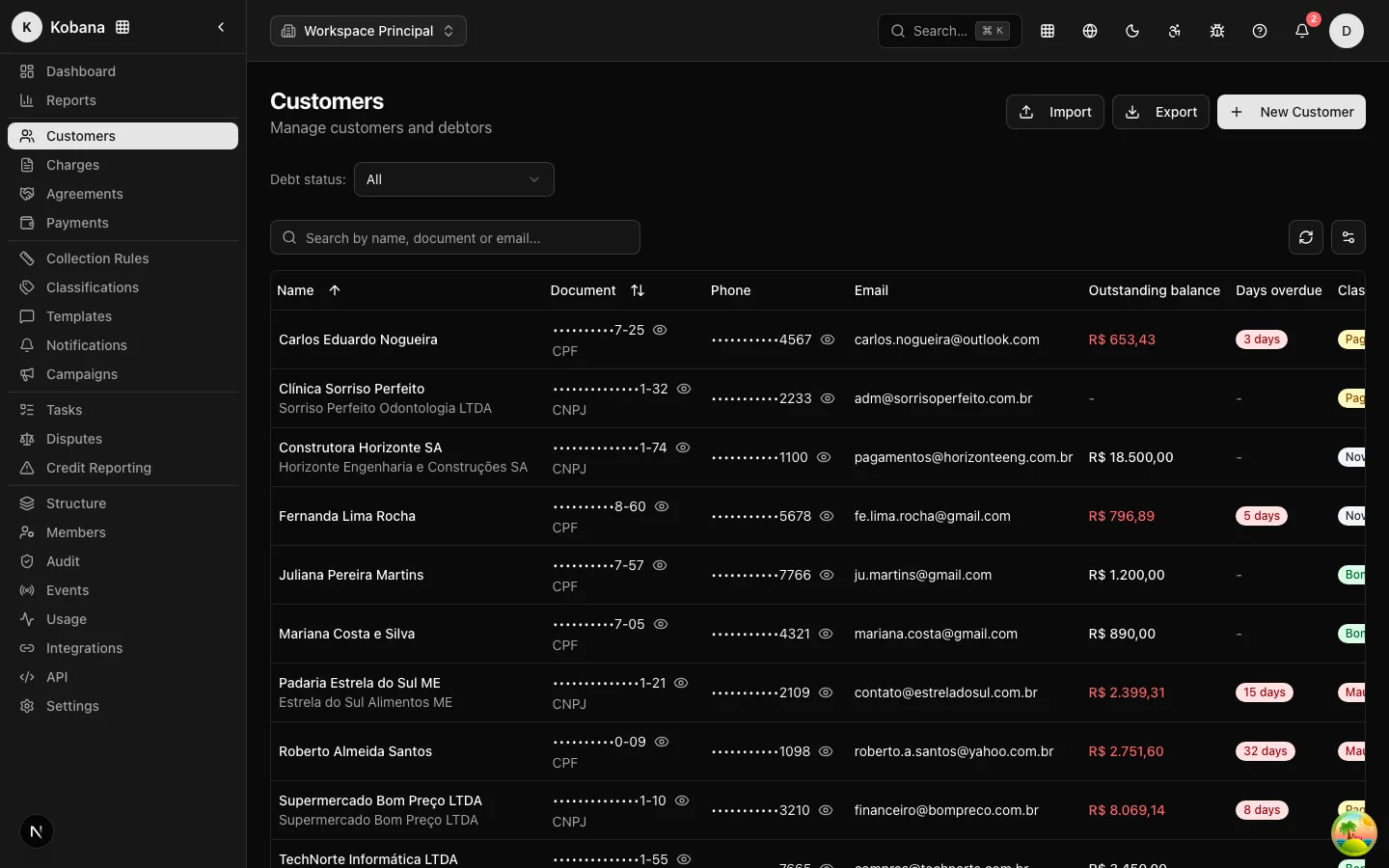
The list
The list shows name, document, phone, email, amount owed, days overdue, classification, and registration date, with search by name, document, or email. The amount owed and the days overdue appear in red when there is delinquency, and show a dash when the person owes nothing. Each row gives access to the View, Edit, and Delete actions.
A Debt status filter slices the portfolio into four options: All, With debt (any open balance), Overdue (with a charge past due), and Up to date (no delinquency). It is the shortcut to separate who needs collecting from who is current.
The record
The New Customer form has these sections:
- Basic Information — Name (required), Legal Name (for companies), Document Type (CPF or CNPJ) and Document Number (digits only), Nickname (or trade name), Date of Birth, Classification, and External ID.
- Emails — as many addresses as needed, with a type (Personal, Business, Financial).
- Phones — country, area code, and number, with a type (Mobile, Landline, Business, WhatsApp).
- Addresses — street, number, unit, district, city, state, and postal code.
- Tags — free-form labels to organize and filter the portfolio.
- Additional Information — free-text Notes and Custom Data in JSON, for storing any business metadata (contract code, account owner, etc.).
Two fields deserve special attention:
- Document (CPF/CNPJ): besides identifying the customer, it is what the debtor uses to confirm their identity on the portal (last 4 digits) and one of the deduplication keys on import.
- External ID (
external_id): the customer's identifier in your system (ERP, CRM, spreadsheet). It is the preferred deduplication key for imports and integrations — when present, it takes precedence over the document. If you keep the portfolio in sync with another system, always fill it in.
The customer detail view
Financial summary on top
Before anything else, four cards give the person's debt position at a glance:
- Total owed — the combined amount of open charges.
- Total overdue — how much of that total is already past due (highlighted in red when there is delinquency).
- Overdue charges — how many charges are past due.
- Aging — the open overdue amount by days-overdue bucket: 1–30, 31–60, 61–90, and 90+. It is the reading of how old that person's debt is; the more weight in the right-hand buckets, the harder the recovery.
These numbers come from the aggregate of all of the person's open charges, not just the ones on screen.
The information cards
The page gathers the record into cards: personal information, classification (with tags and notes), contacts, addresses, the person's latest charges (with due date and days overdue), recent notifications, recent interactions, and the custom data.
In contacts, each email and phone has a copy button, and every phone gets a shortcut to open the conversation on WhatsApp straight to the number, saving typing at the moment of contact.
The interactive statement
The statement now appears on screen, not only as a PDF. The section shows the totals (open, overdue, total owed, and already paid) and a table with the position of each of the person's charges (document, due date, status, original and current amount), updated as of the query date. The Download PDF button generates the same position as a document to send or archive. See Generated documents.
The actions
At the top, alongside Edit and Delete, sit specific actions:
- Portal Link — generates a secure debtor portal link for this person. Generating a new link revokes previous ones; the link expires, and the debtor confirms the last 4 digits of their document before seeing any amounts.
- Statement — opens the position of all of the person's charges (the statement described above), with the option to download a PDF.
- New charge — creates a charge already linked to this person, with no need to look them up again in the form.
- Reclassify — manually changes the customer's classification, with an optional reason field. See Classifications to understand when this is necessary and when the system does it on its own.
In the recent interactions card, the Register contact button opens a dialog to log an interaction by hand: the type (call, email, WhatsApp, meeting, or note), the direction (received or sent), and a summary of what was discussed. It is how the operation keeps in the person's history a contact that happened outside the rule (a call, an in-person conversation). Via the API, the interaction can also carry the outcome — including a payment promise, which pauses the rule until the promised date.
Best practices
- Contact info is the rule's fuel: a customer with no email or phone receives nothing. Prioritize completing these fields on import.
- Deleting is permanent (the interface asks for confirmation). If the problem is "do not contact", the right path is suppression/opt-out, which preserves the history.
- Use tags for operational slices (legacy portfolio, wholesale, region) and Custom Data for whatever needs to travel with the customer in integrations.