Classifications
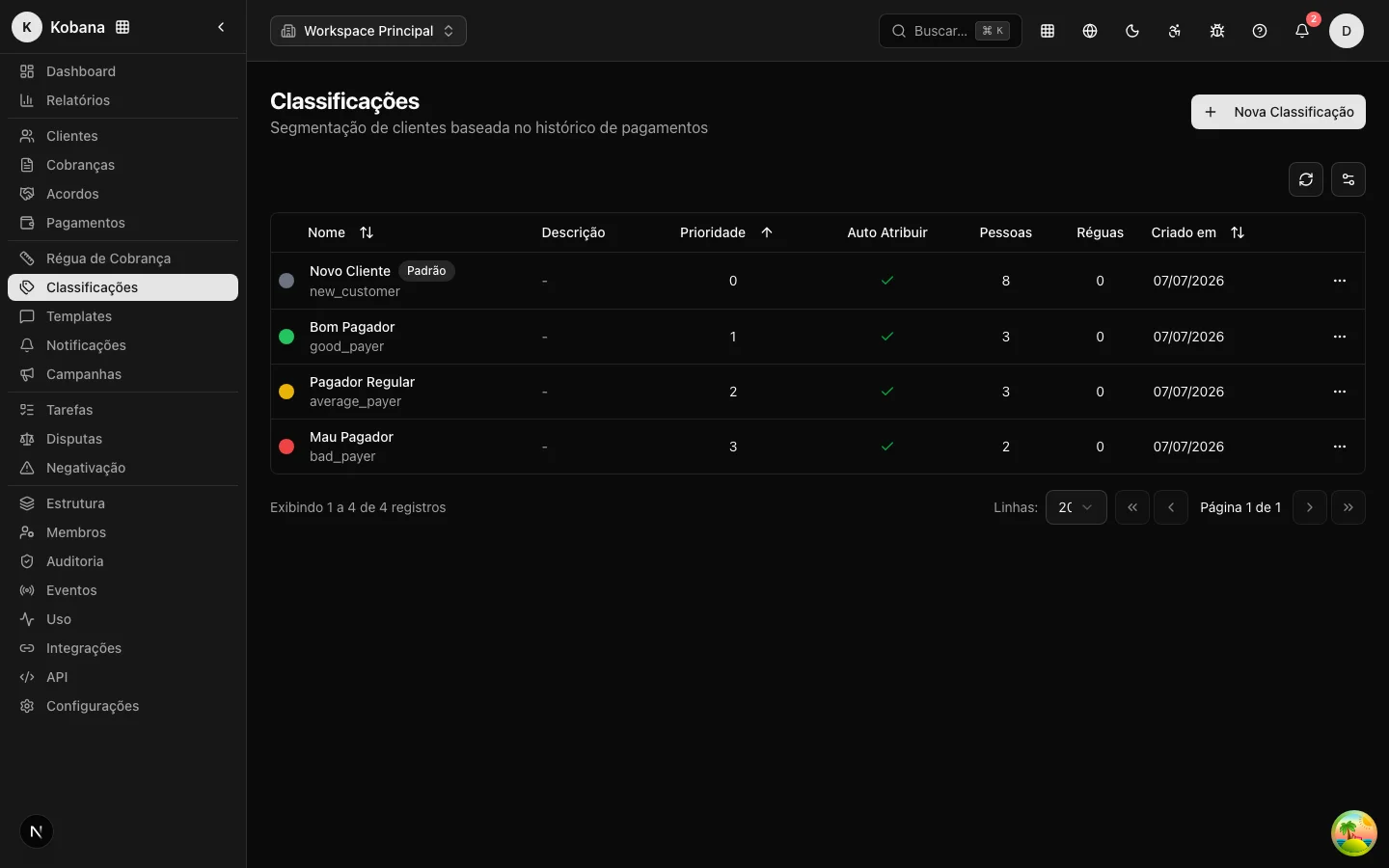
Classifications segment the portfolio by payment behavior: New, Good, Regular, Bad payer — or any other split that makes sense for your operation. The Classifications page in the sidebar menu lists each one with its name, priority, whether it is auto-assigned, how many people are in it, and how many rules use it.
A classification has a name, code, color, description, and priority, and can be marked as Default (receives anyone who does not fit any other) and as Auto Assign (participates in automatic classification).
Classification criteria
Each classification can define objective criteria, calculated over the customer's charge history within an evaluation period (by default, the last 12 months; cancelled charges are excluded):
- Min./Max. On-Time Payments — percentage of charges paid by the due date, among those paid.
- Max. Consecutive Late Payments — the longest streak of charges paid late or still overdue.
- Max. Current Days Overdue — the delay of the oldest open overdue charge.
- Min./Max. Charges — minimum/maximum number of charges in the period (useful to separate "New" from those with history).
- Credit Bureau History / Protest History — whether the customer has (or does not have) records of that kind.
A customer fits a classification when they meet all of its criteria. When more than one fits, the highest priority wins — the system evaluates from highest priority to lowest and stops at the first match. Anyone who fits none goes to the Default classification.
:::note Criteria don't ship ready — they must be configured The classifications that come with the account (New, Good, Average, Bad payer) are created without any criteria defined, even with Auto Assign on. Until you configure each one's thresholds, automatic classification has nothing to match against and every customer falls into the Default classification. Set the criteria (above) before relying on automatic segmentation. :::
Automatic classification
The system reclassifies the portfolio on its own at two moments:
- Weekly — an automatic process runs every week (early Sunday morning) and re-evaluates every customer in the account against the criteria of active classifications with Auto Assign enabled.
- After each payment — when a charge is paid, that charge's customer is re-evaluated immediately. A good payment can promote the customer without waiting for the weekly run.
Only active classifications with Auto Assign enabled participate in automatic assignment. Manual classifications (Auto Assign off) are never overwritten by the automatic process.
When someone's classification changes, the system emits the person.classification_changed webhook event — useful for keeping your CRM or ERP in sync.
Manual reclassification
On the customer detail view, the Reclassify button lets you change the classification by hand, with an optional reason field. Use it for exceptions the numbers do not capture (a commercial arrangement, a strategic customer).
Use in the collection rule
A classification is not just a label: collection rules can be associated with a classification. This lets you treat different profiles with different approaches — a gentle reminder for good payers, a firmer and shorter sequence for bad payers. On each classification's detail view you can see how many rules are associated with it.
Best practices
- Start simple: three or four classifications with clear criteria are worth more than ten overlapping ones.
- Review priorities when creating a new classification — the evaluation order decides ties.
- Keep a Default classification defined, so no customer is left without a label.