Installments and default
Accepting an agreement generates the installment plan; from then on, management is about the installments — recording payments, tracking late ones and reacting to a break.
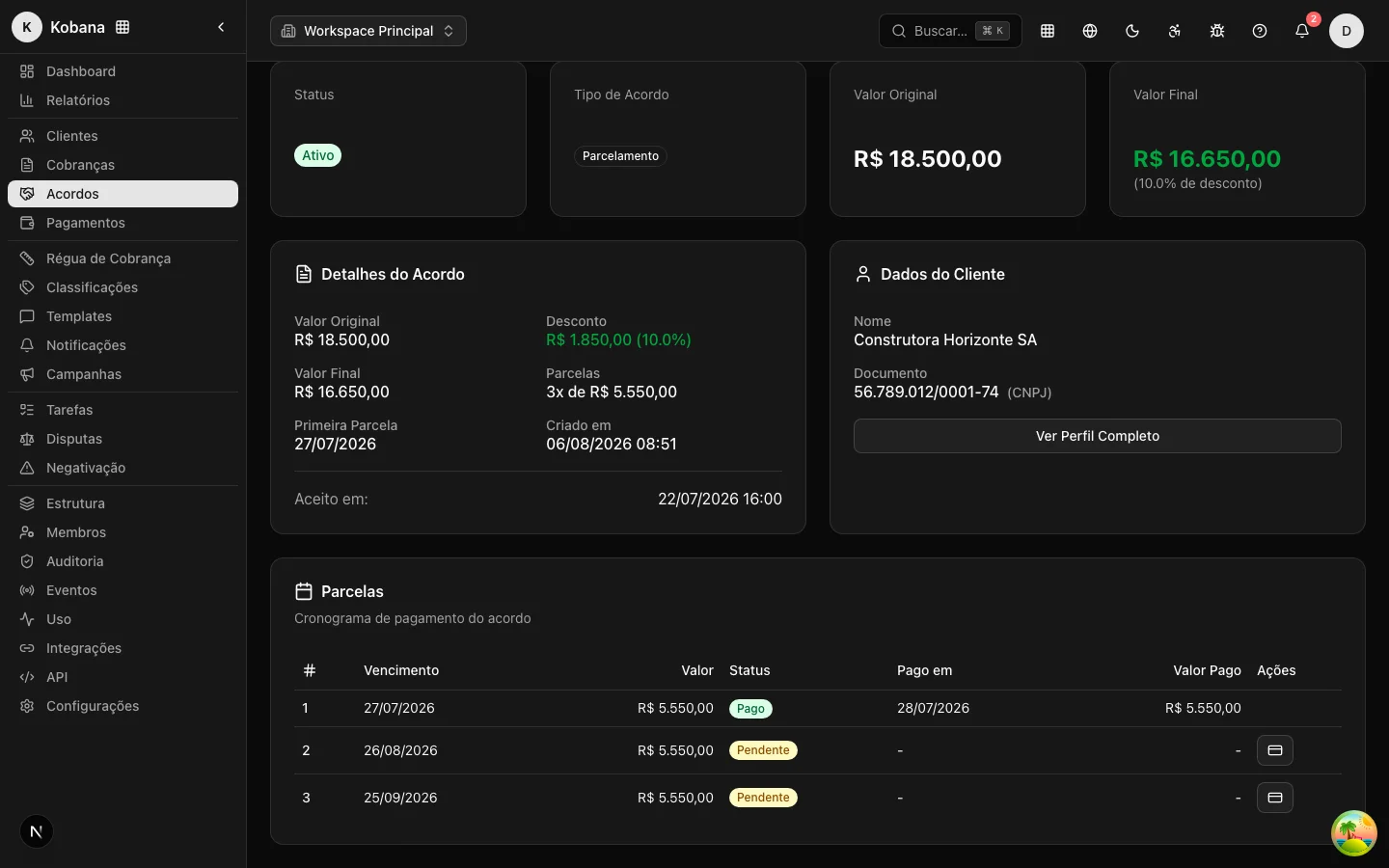
How installments are generated
At the moment of acceptance, the system automatically creates one installment per month, starting from the date of the first:
- Amount of each installment = final amount ÷ number of installments, rounded to 2 decimal places;
- The last installment absorbs the rounding, guaranteeing the sum matches the agreement's final amount exactly (e.g. R$ 1,000.00 in 3 installments becomes 333.33 + 333.33 + 333.34);
- Monthly due dates — same base date, month after month (agreement accepted in the portal: first installment due in 10 days).
Each installment has its own cycle:
| Status | Meaning |
|---|---|
pending | Open, awaiting payment |
paid | Paid (with payment amount and date recorded) |
overdue | Past due without payment (marked automatically by the daily check) |
cancelled | Cancelled (e.g. agreement cancelled) |
Recording installment payments
Record the payment with the amount paid and the date — from the agreement screen or via the API (PUT /api/v1/agreements/{id}/installments). Only installments of accepted or active agreements can be updated; a cancelled installment cannot be changed. The agreement screen consolidates the progress: how many installments paid, amount already received and remaining balance.
Agreement break
The break is detected automatically. A daily process (in the early hours, right after the calendar day rolls over) scans accepted and active agreements and:
- Marks overdue installments — a
pendinginstallment whose due date has passed becomesoverdue(counted in calendar days, in the organization's timezone). - Breaks the agreement after the grace period — if the most overdue installment exceeds the 5-calendar-day grace period, the agreement becomes
defaulted(displayed as "Defaulted"). With the default, the break happens on the 6th day of delay: the installment can be paid at any point during the grace period with no consequence. The grace period can be adjusted per agreement via the API (graceDaysfield in the agreement's metadata;0breaks on the first day of delay). - Returns the charges to the collection rule — at the same moment as the break, the charges that were
negotiatedbecause of the agreement are reverted and re-enrolled into the current rule (see below). - Completes what was settled — the same scan closes the other side: an active agreement with no open installments becomes
completedon its own. Nobody needs to "close out" an agreement whose installments were all paid.
The break emits the agreement.broken webhook, enters the audit trail and posts an alert to the team's notification bell ("Agreement broken"). Two paths from there:
- Regularization — the debtor catches up on the installments and the agreement returns to
active. Nothing is lost. - Cancellation — you close the agreement (
cancelled); the still-pending installments are cancelled along with it.
Effect on the original charge
When the agreement was accepted, the original charge exited the rule with status negotiated. The automatic break — and cancellation too — reopens things: each charge that was negotiated because of that agreement is reverted — back to overdue if already past due, or pending if the due date is still in the future — and re-enrolled into the current collection rule, resuming collection wherever it makes sense. With the charge back to overdue, the daily check treats it like any other overdue charge.
This reversion respects a few safeguards:
- The reversion acts per charge linked to this agreement, not per person: a charge only stays
negotiatedif it is also linked to another live agreement (accepted/active). The other charges in this agreement are reopened normally — breaking or cancelling one agreement never keeps another agreement's charges locked. - Charges already paid or cancelled are untouched; the reversion only acts on what the state machine allows.
- Each reversion is recorded in the audit trail (reason
agreement_defaultedfor the automatic break,agreement_cancelledfor cancellation).
The detection goes by the installment status in the system. An installment paid through another means (direct transfer, over-the-counter payment) needs its payment recorded before the grace period ends — an installment settled in the real world but still open in the system breaks the agreement and returns the charge to the collection rule.
Effects on the balance
The agreement does not erase the original debt at acceptance — the discount only becomes final upon fulfillment:
- Completed agreement (
completed): the debt is settled at the agreed final amount; the difference (the discount) is the cost of recovery. - Broken agreement: the discount was conditional on fulfillment. The original charge becomes collectible again at the updated amount — and the daily recalculation of interest and fine starts from the charge's original amount. If installments were paid before the break, adjust the charge amount to reflect what was already paid.
Tracking
The Agreements list shows original amount, discount, final amount, installments and status of each agreement. Filter by status (defaulted, "Defaulted") to see the portfolio of broken agreements that needs action, and follow the webhooks (agreement.broken, agreement.completed and the other agreement events) to reconcile with finance.